CUDA Tutorial for Beginners: Adding Two Arrays on a GPU
In this post, we’ll learn how a program adds two arrays on a GPU, using CUDA. It’s a small problem, and it contains the main ideas of GPU programming. You only need to know arrays, loops and a little C, because we’ll explain each GPU idea when it first appears.
By the end, you’ll know how to split this problem into pieces, how the data reaches the GPU, and how to read the code that does it.
What a GPU is good at
A CPU is built to finish each thread of work as quickly as possible, and it runs a few tens of threads at once. A GPU runs thousands of threads at once. Each one is slower, but together they can get through much more work.
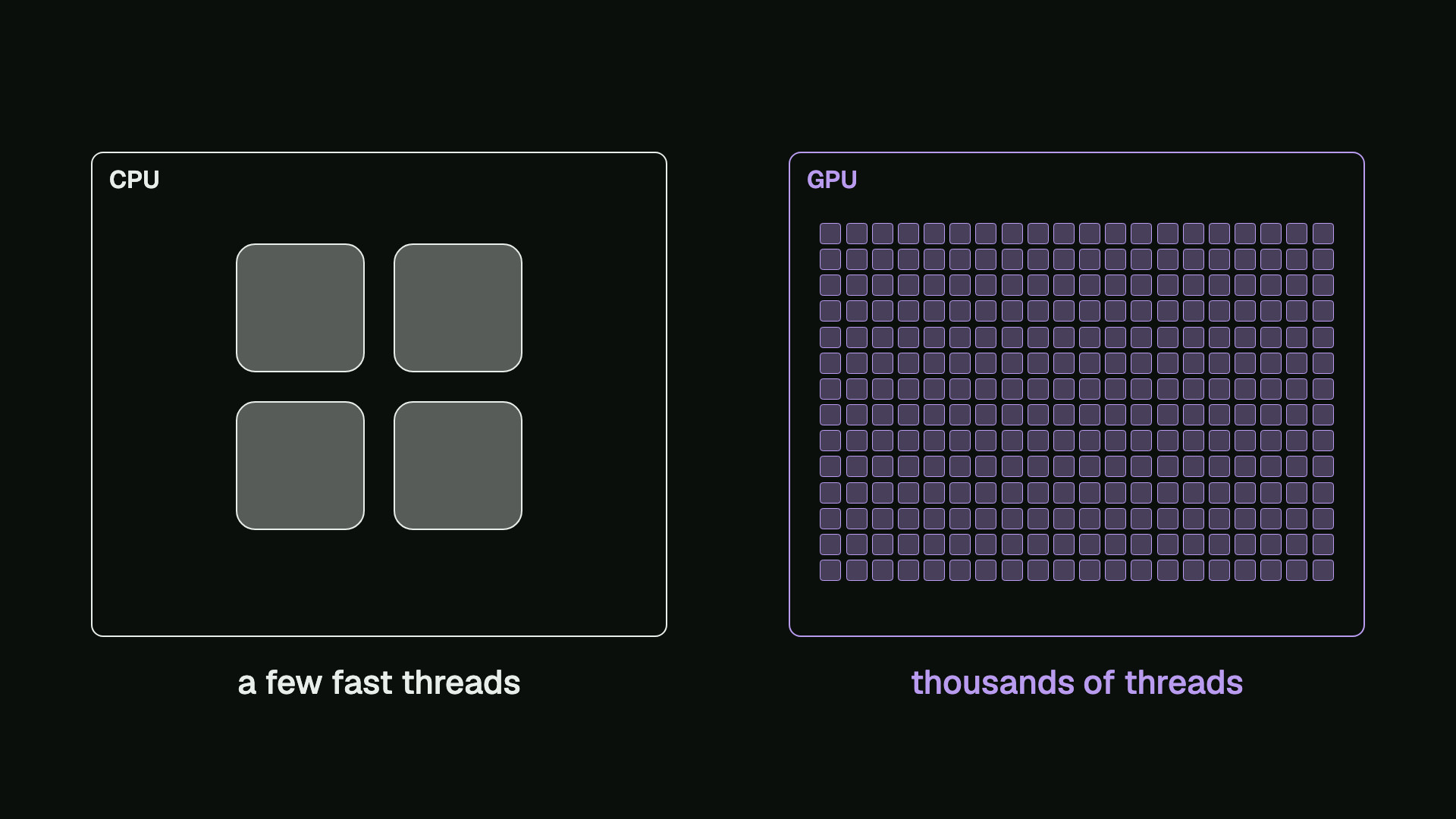
That only helps when a problem can be split into many pieces that run at the same time, so the first question is whether our problem can.
Data parallelism
We have two arrays, a and b, with eight numbers each. We want a third array, c, where each element is the sum of the two elements above it. On a CPU, we would write a loop:
// The same work on the CPU, one element at a time.
void vecAddCpu(const float* a, const float* b, float* c,
               int n) {
    for (int i = 0; i < n; i++) {
        c[i] = a[i] + b[i];
    }
}
The loop starts at element 0, where 1 + 5 is 6, and then it moves along one element at a time. But look at what each step needs. To find element 6, we add 7 and 1, and we don’t need element 5 or any other result. The order of the steps doesn’t matter, so all eight additions could happen at the same moment.
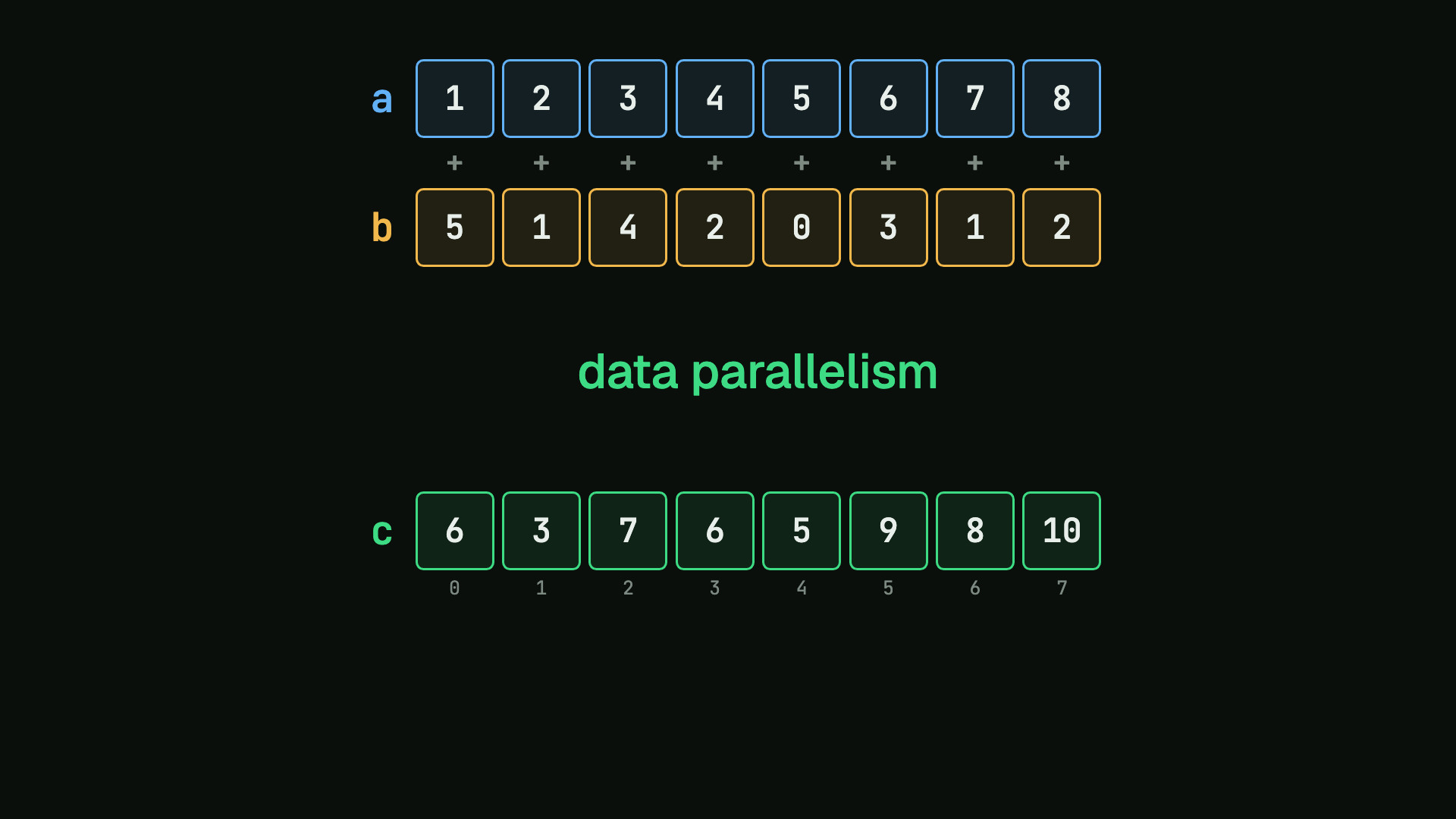
When one operation runs independently on many elements, we call it data parallelism, and it is the kind of work a GPU is built for.
Two memories and five steps
Before the GPU can add anything, it needs the numbers. A program starts on the CPU, which we call the host, so our arrays begin in the host’s memory. The GPU is called the device. In the basic model that we use here, it has a separate memory, and our GPU code works on the data in that memory.
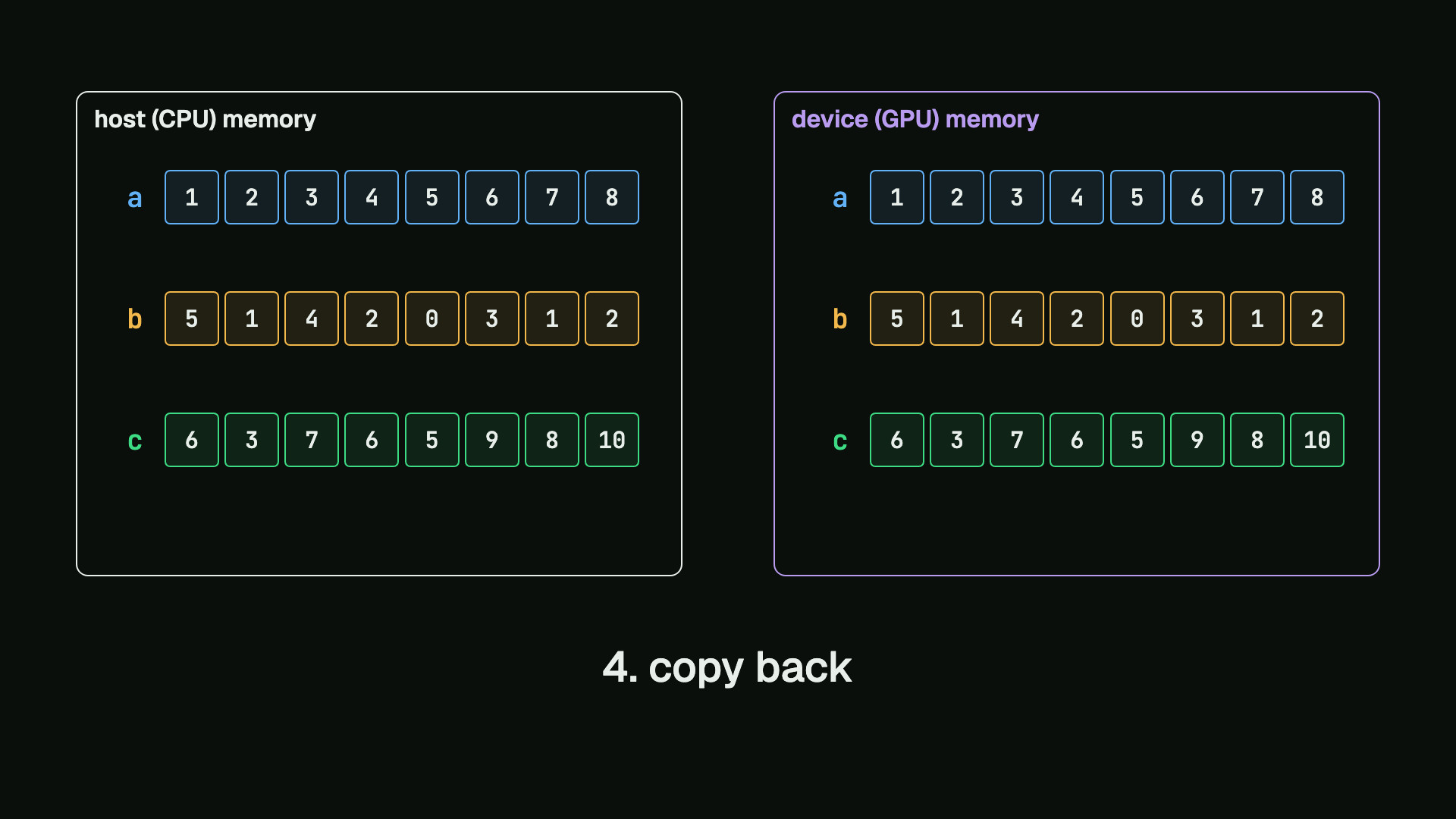
That gives the program five steps:
- Allocate device memory for all three arrays. The new memory isn’t cleared, so we don’t know what it holds.
- Copy in the inputs,
aandb, from the host to the device. - Compute every sum on the device, which writes it into the device’s own
c. - Copy back
c, because until then the host doesn’t have the answer. - Free the device memory.
Threads, blocks and the index
Let’s look closely at step 3. The simplest way to divide eight additions is to give every element its own thread. A thread runs through a list of instructions on its own, from top to bottom.
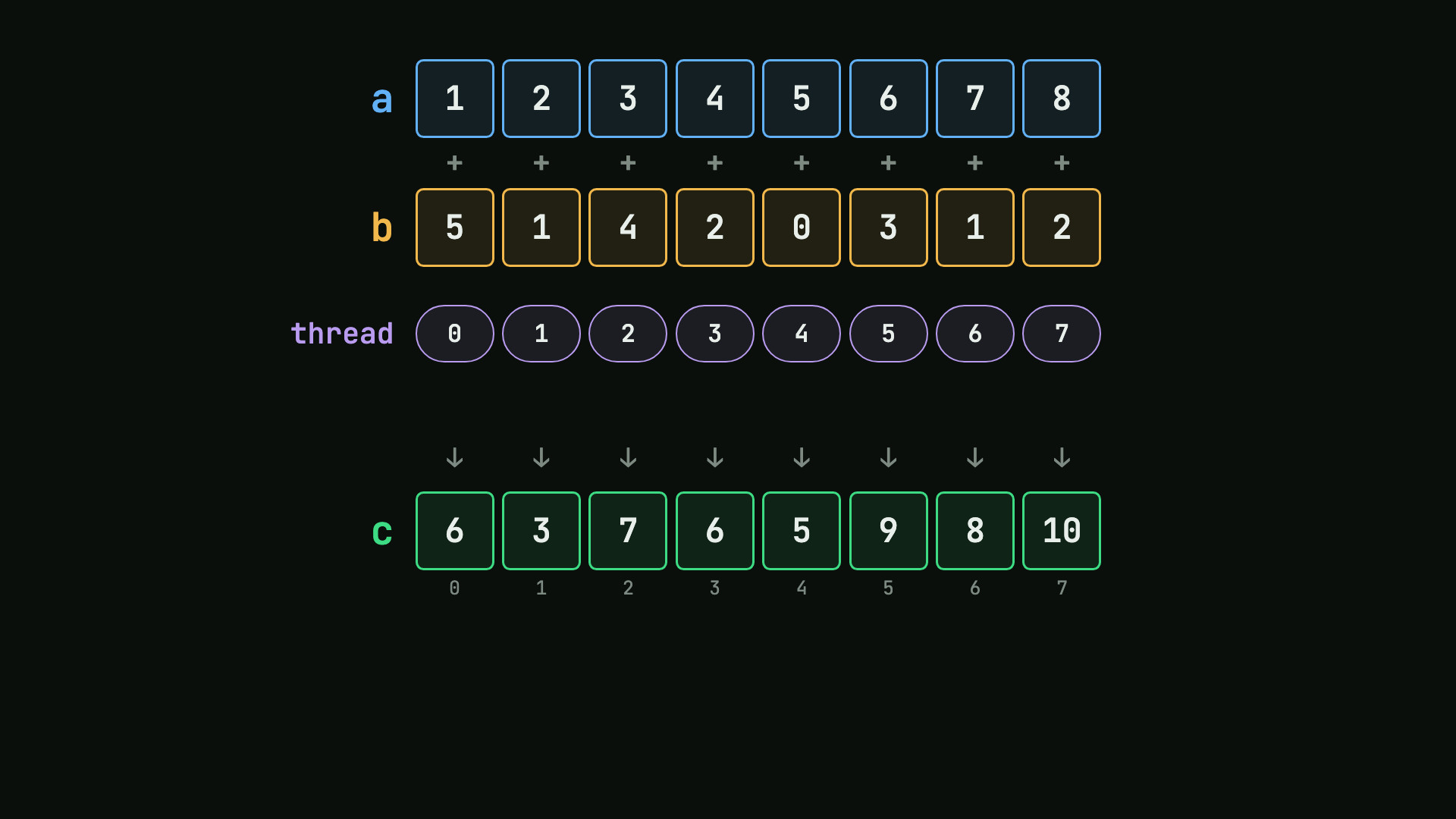
Every thread runs the same function, which is called a kernel. We don’t write a loop over the elements any more, because starting the threads takes the place of the loop.
CUDA doesn’t start these threads as one long row. It groups them into blocks of equal size, and all the blocks of one launch form a grid. Here we choose four threads to a block, so we get block 0 and block 1.
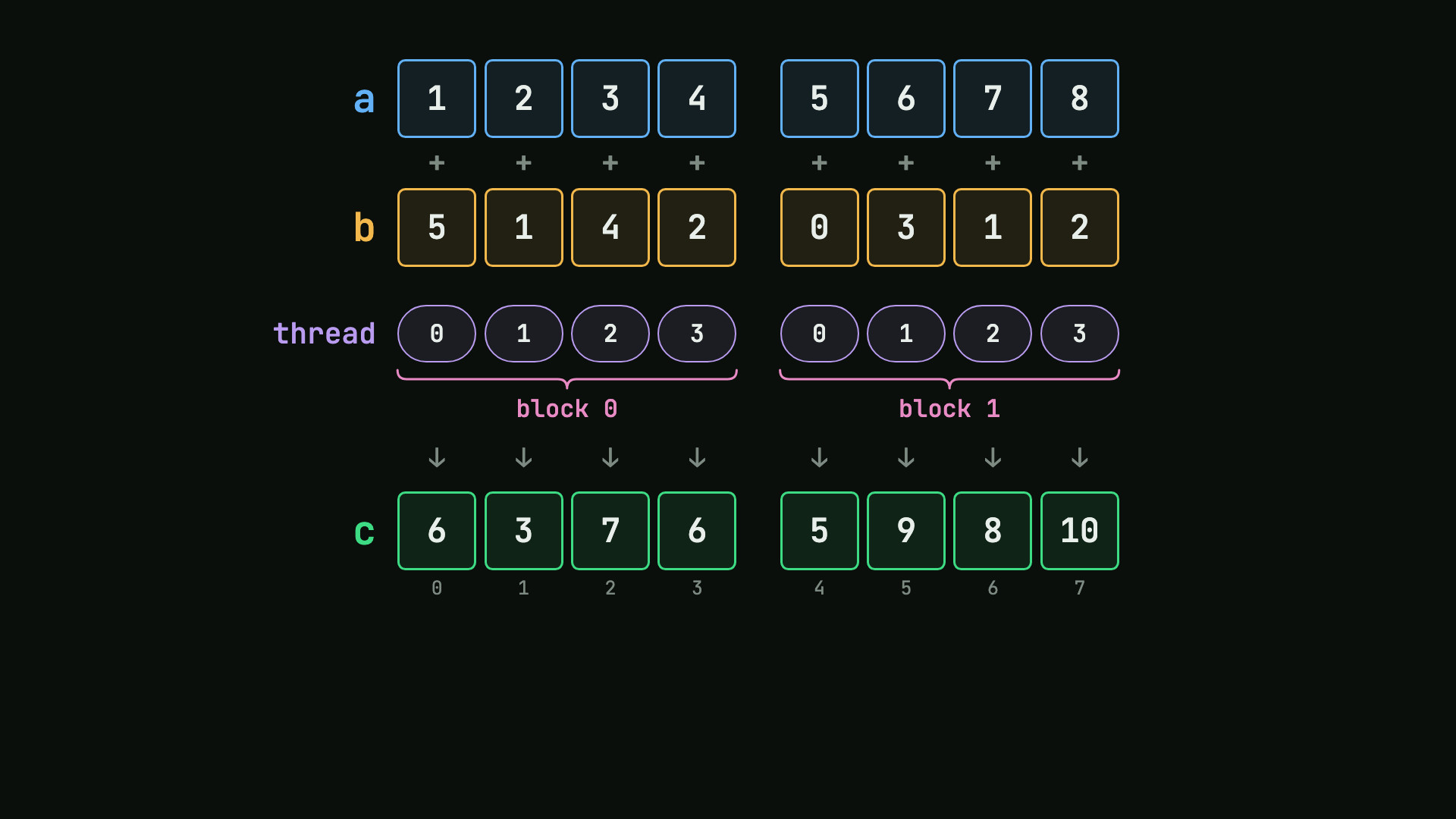
Blocks exist because a block has a limited size, up to 1,024 threads on current GPUs. A bigger job needs more blocks, and the GPU can run them in any order, as many at once as it can fit.
But now there is a problem. The thread numbers start again in every block, so there are two threads called 2. How does the one in block 1 know which element belongs to it?
It knows that it is thread 2 in block 1. One whole block comes before it, which is four elements, and two more takes it to element 6. So it adds 7 and 1, and writes 8.
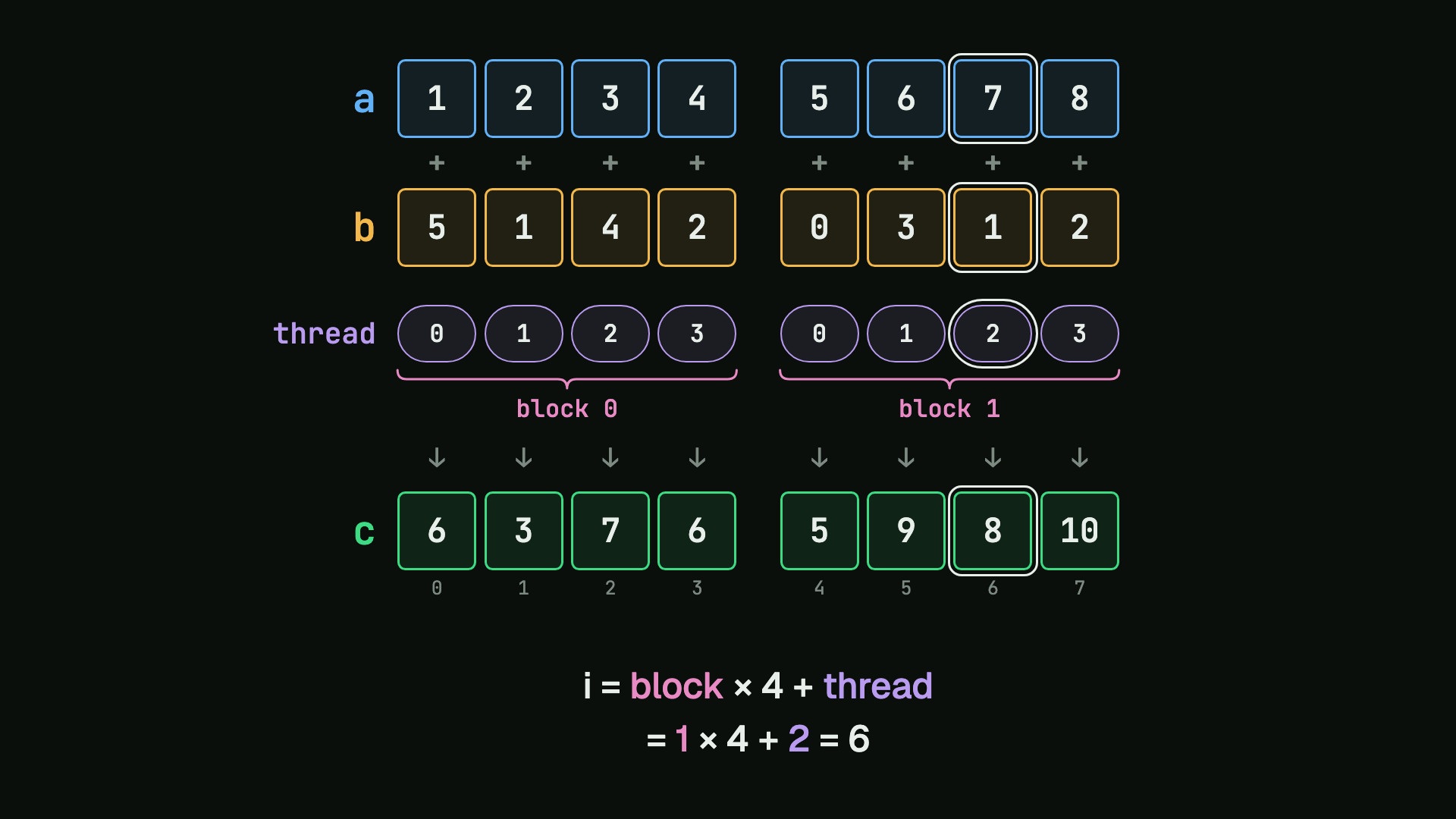
This works for every thread. The index is the block number, times the number of threads in a block, plus the thread number:
i = block * threads_per_block + thread
With that one rule, each thread finds a different element.
When the sizes don’t fit
Eight elements fit perfectly into blocks of four, but ten don’t. If we divide 10 by 4 and round down, we get two blocks, which is only eight threads, and elements 8 and 9 would never be computed.
So we round up to three blocks. Now every element has a thread, but we started twelve threads for ten elements, and the last two would calculate index 10 and index 11, which are outside our arrays.
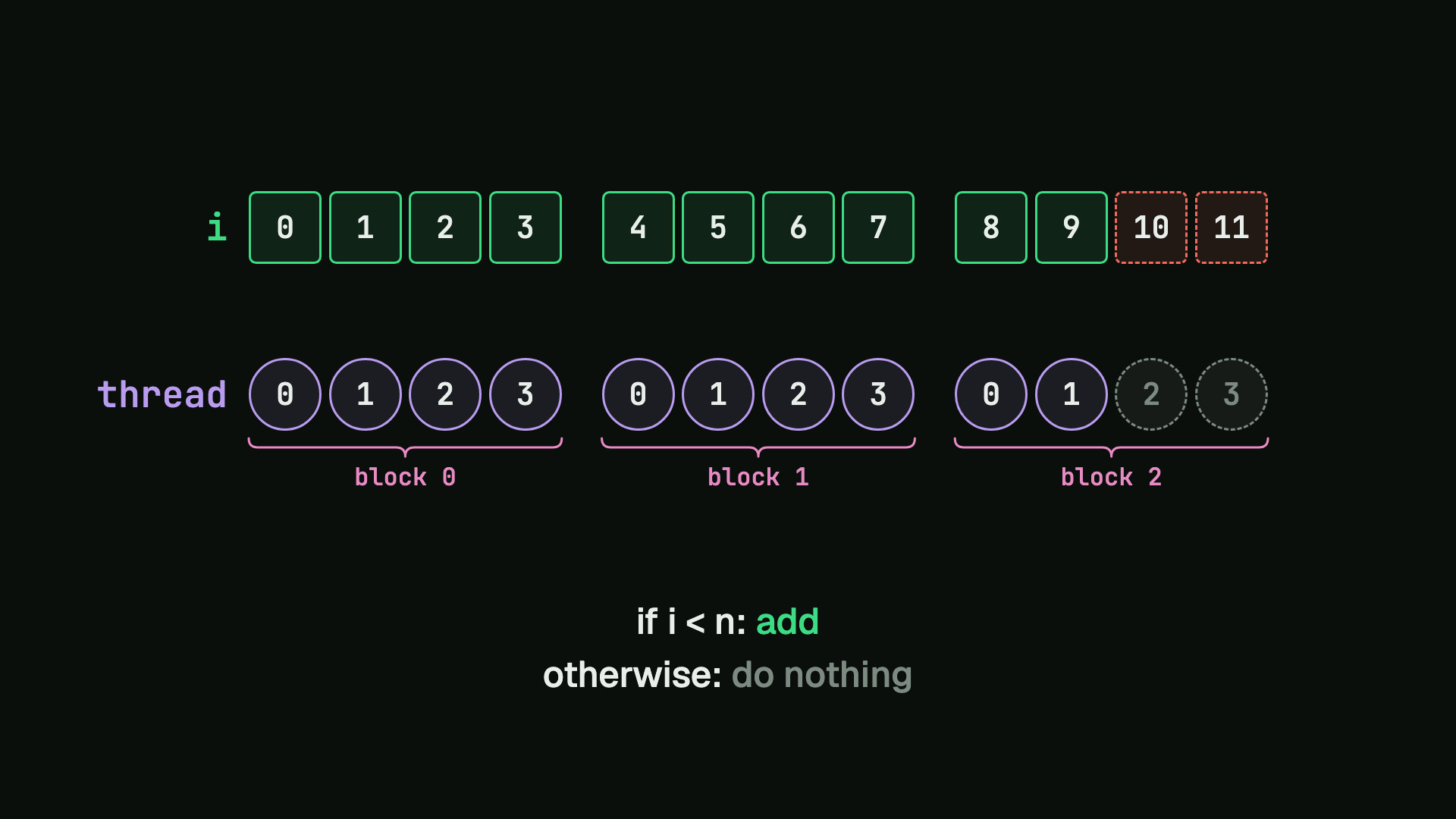
The GPU won’t skip those threads for us. Each thread has to check its own index: if i is less than n, the number of elements, it does the addition, and otherwise it does nothing.
The code
The kernel
We can now read the kernel, because every line is already on our picture.
// The kernel. Every thread runs it once: it works out which
// element is its own, and adds that one pair.
__global__ void vecAdd(const float* a, const float* b,
                       float* c, int n) {
    int i = blockIdx.x * blockDim.x + threadIdx.x;
    if (i < n) {
        c[i] = a[i] + b[i];
    }
}
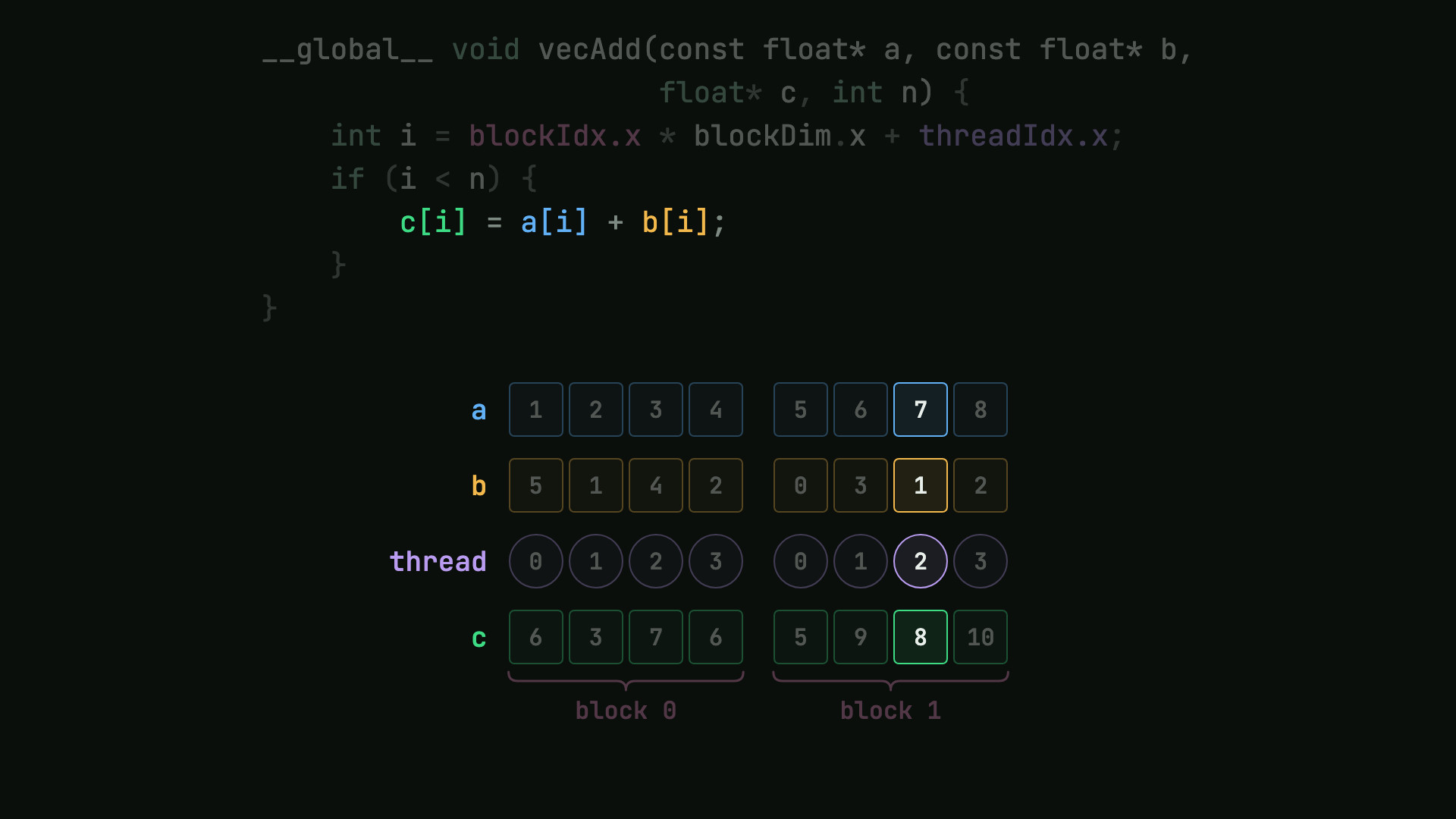
__global__marks a function that the host launches and the GPU runs.blockIdx.xis the block number,blockDim.xis the size of a block, andthreadIdx.xis the thread number. The.xis there because a grid can have up to three dimensions, and we use one.if (i < n)is the bounds check.- The line inside it is the addition. For our thread, it reads element 6 of
aand ofb, and it writes element 6 ofc.
The five steps on the host
The rest runs on the host. First, we allocate device memory with cudaMalloc, once for each array. The size is in bytes, and CUDA_CHECK is a small wrapper in this program that stops it if a call reports an error.
    // Device (GPU) memory for the same three vectors.
    float *d_a, *d_b, *d_c;
    CUDA_CHECK(cudaMalloc(&d_a, bytes));
    CUDA_CHECK(cudaMalloc(&d_b, bytes));
    CUDA_CHECK(cudaMalloc(&d_c, bytes));
Second, we copy the inputs in. cudaMemcpy takes the destination first, then the source, the size and the direction. The cudaEventRecord calls around the copies only mark points in time, so that we can measure them.
    // Copy the inputs from host memory to device memory.
    CUDA_CHECK(cudaEventRecord(ev[0]));
    CUDA_CHECK(cudaMemcpy(d_a, a, bytes,
                          cudaMemcpyHostToDevice));
    CUDA_CHECK(cudaMemcpy(d_b, b, bytes,
                          cudaMemcpyHostToDevice));
    CUDA_CHECK(cudaEventRecord(ev[1]));
Before the third step, we choose the number of blocks. Integer division throws away the remainder, so we round up by adding one less than the block size to n before we divide.
int blocks = (n + threads - 1) / threads;
Third, we launch the kernel. Inside the triple angle brackets are the number of blocks and then the threads in each block. The arguments are the device’s copies of the arrays, because that is the memory the kernel works on. This program launches twice and times the second launch, because the first also loads the kernel onto the GPU.
    // Launch the grid twice and time the second launch,
    // because the first also loads the kernel onto the GPU.
    vecAdd<<<blocks, threads>>>(d_a, d_b, d_c, n);
    CUDA_CHECK(cudaGetLastError());
    CUDA_CHECK(cudaEventRecord(ev[2]));
    vecAdd<<<blocks, threads>>>(d_a, d_b, d_c, n);
    CUDA_CHECK(cudaGetLastError());
    CUDA_CHECK(cudaEventRecord(ev[3]));
A launch returns before the GPU has finished. So fourth, we copy c back with the direction reversed, and then wait for the GPU’s last event before we use the result.
    // Copy the result back to host memory.
    CUDA_CHECK(cudaMemcpy(c, d_c, bytes,
                          cudaMemcpyDeviceToHost));
    CUDA_CHECK(cudaEventRecord(ev[4]));
    CUDA_CHECK(cudaEventSynchronize(ev[4]));
Fifth, we free all three device arrays.
    CUDA_CHECK(cudaFree(d_a));
    CUDA_CHECK(cudaFree(d_b));
    CUDA_CHECK(cudaFree(d_c));
Running it on an NVIDIA GPU
Let’s run it with a million numbers in each array and 256 threads to a block, which rounds up to 3,907 blocks. We compile it with nvcc, where -arch=sm_75 names the compute capability of the GPU that this run used:
nvcc -O2 -arch=sm_75 -o vec_add vec_add.cu
The program times the two copies, the kernel and the same addition as a CPU loop. At the end, it compares every sum with the CPU’s answer.
$ nvcc -O2 -arch=sm_75 -o vec_add vec_add.cu
$ ./vec_add
vector size: 1000000 floats (4.0 MB each)
grid: 3907 blocks of 256 threads (1000192 threads)
host to device (a, b):   2.076 ms
kernel:                  0.051 ms
device to host (c):      2.830 ms
CPU loop:                2.166 ms
check: all 1000000 sums match the CPU
All one million sums match. Here are the times, drawn to scale:
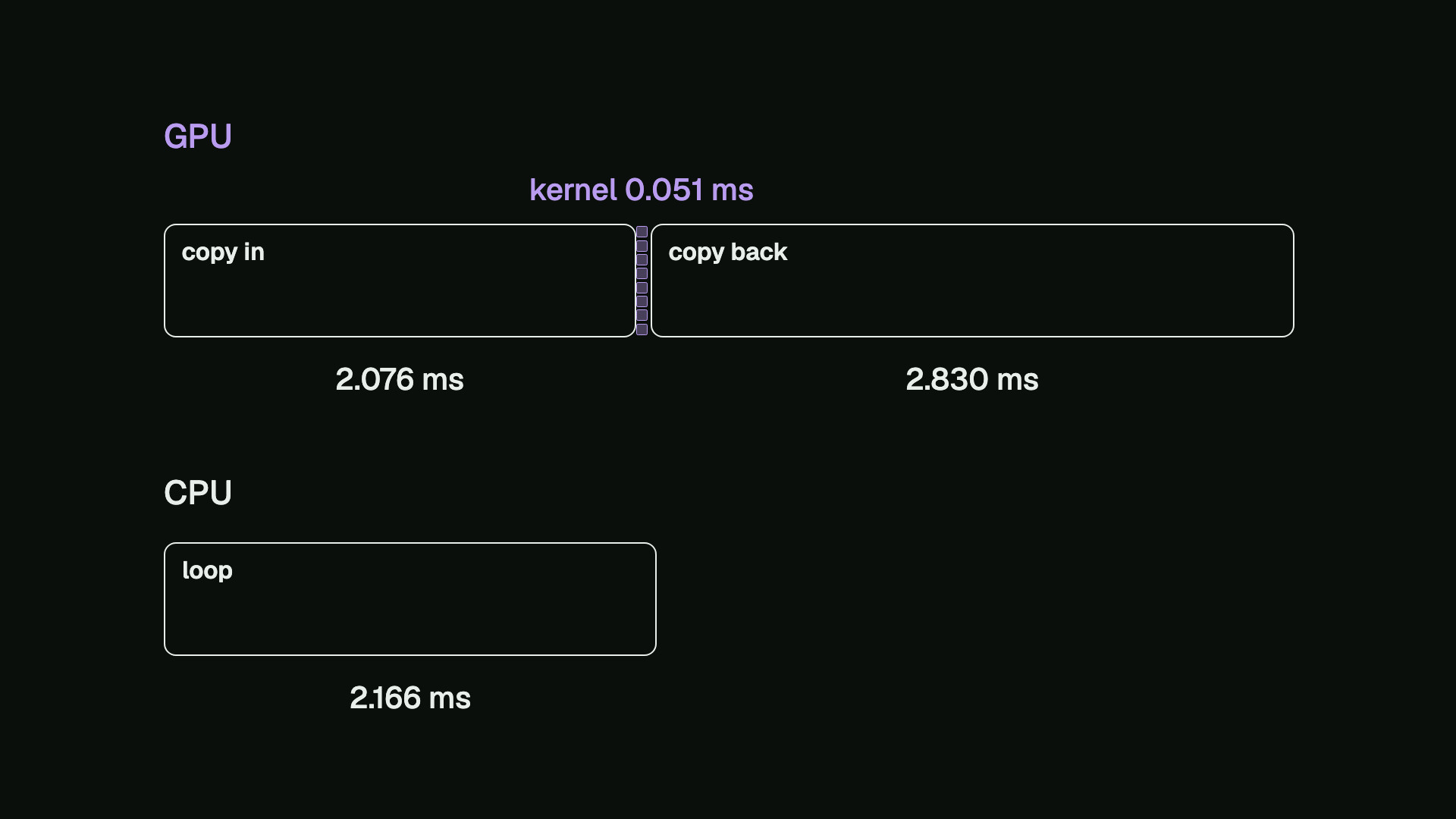
In this run, the kernel by itself was more than 40 times as fast as the CPU loop. With the copies included, though, the GPU took more than twice as long as the CPU, because about 99% of its measured time was copying.
One addition for each element is very little work. Moving data to a GPU is worth it only when the time saved on the computation is more than the time spent moving it.
What happens without the bounds check
Now let’s test the idea of the bounds check. This is the same kernel with the check taken out, so all the extra threads will use an index past the end.
// The kernel, missing its bounds check: a thread whose i is
// past the end still reads a[i] and b[i] and writes c[i].
__global__ void vecAdd(const float* a, const float* b,
                       float* c, int n) {
    int i = blockIdx.x * blockDim.x + threadIdx.x;
    c[i] = a[i] + b[i];
}
We build it with -lineinfo, so that errors can point to a source line. Then we run it on its own, and again under Compute Sanitizer, a tool that checks memory accesses.
$ nvcc -O2 -arch=sm_75 -lineinfo -o vec_add_no_check vec_add_no_check.cu
$ ./vec_add_no_check
vector size: 1000000 floats (4.0 MB each)
grid: 3907 blocks of 256 threads (1000192 threads)
host to device (a, b):   1.998 ms
kernel:                  0.051 ms
device to host (c):      2.636 ms
CPU loop:                2.260 ms
check: all 1000000 sums match the CPU
$ compute-sanitizer --print-limit 1 --show-backtrace no ./vec_add_no_check
========= COMPUTE-SANITIZER
vector size: 1000000 floats (4.0 MB each)
grid: 3907 blocks of 256 threads (1000192 threads)
========= Invalid __global__ read of size 4 bytes
=========     at vecAdd(const float *, const float *, float *, int)+0x70 in vec_add_no_check.cu:33
=========     by thread (96,0,0) in block (3906,0,0)
=========     Access to 0x7b47953d0980 is out of bounds
=========     and is 129 bytes after the nearest allocation at 0x7b4795000000 of size 4,000,000 bytes
=========
CUDA error: unspecified launch failure (vec_add_no_check.cu:122)
========= Target application returned an error
========= ERROR SUMMARY: 97 errors
========= ERROR SUMMARY: 96 errors were not printed. Use --print-limit option to adjust the number of printed errors
On its own, it still reports that all one million sums match, so the mistake is invisible. Compute Sanitizer finds an invalid read by thread 96 in block 3906, and we can check that with our rule: 3906 × 256 + 96 is index 1,000,032, while the last valid index is 999,999.
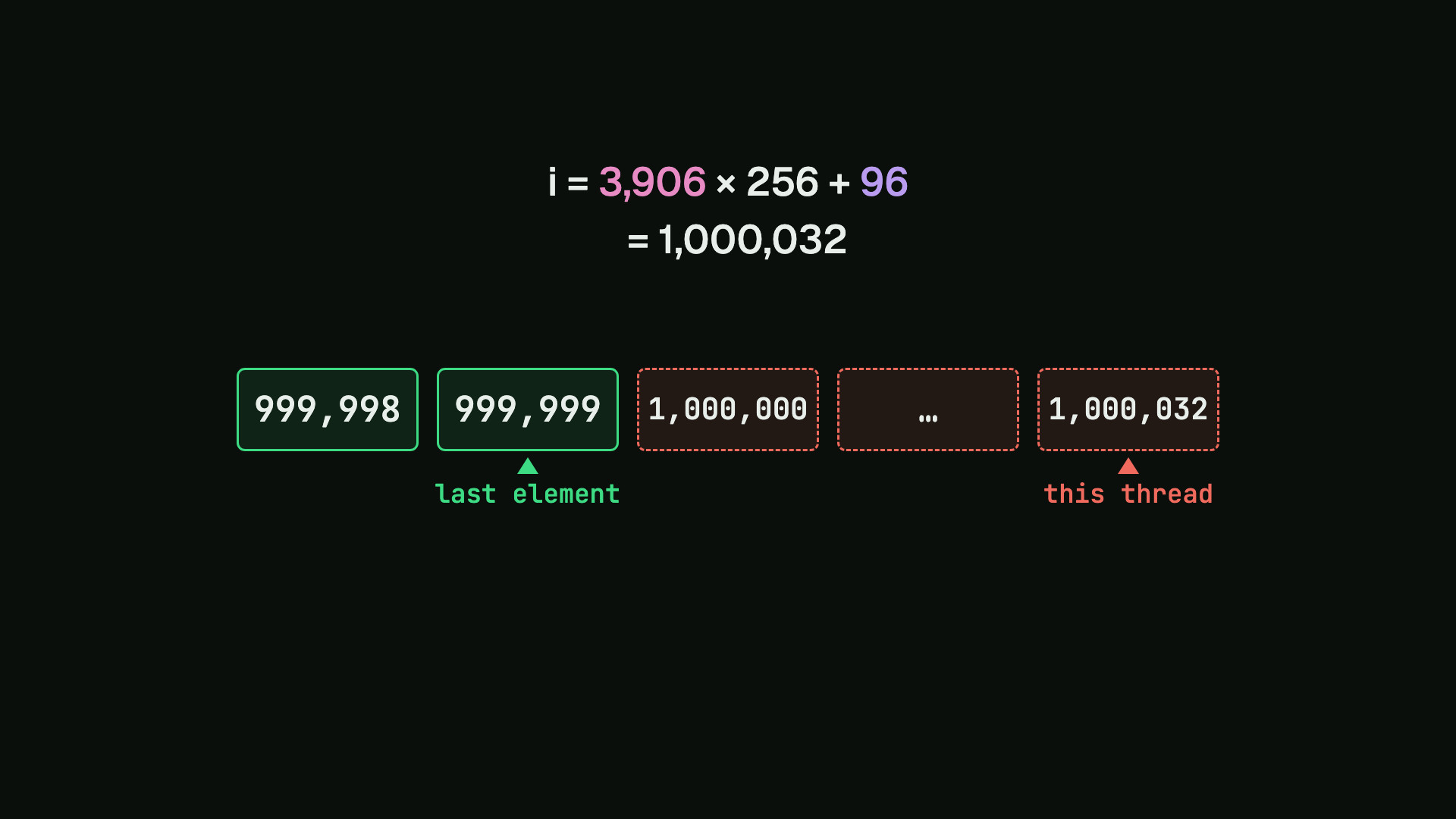
That thread was outside the array, exactly as the picture predicted. A correct result doesn’t prove that a kernel is correct, and that is why the check belongs in the kernel.
Recap
- The host and the device have their own memories, so we allocate, copy in, compute, copy back and free.
- The sums are independent, so each thread takes one element.
- Threads are grouped into blocks, and a thread finds its element from the block number and its own number.
- We round the number of blocks up, and every thread checks that its index is inside the array.
- When we measure the speed, we count the copies as well as the kernel.
The full source
// vec_add.cu: adds two vectors on the GPU, then checks
// every sum against the same addition done on the CPU.
//
// Build: nvcc -O2 -arch=sm_75 -o vec_add vec_add.cu
// Run:   ./vec_add [threads per block, 256 by default]
#include <chrono>
#include <cstdio>
#include <cstdlib>

// Stops the program with CUDA's own message, the file and
// the line whenever a CUDA call fails.
#define CUDA_CHECK(call)                                \
    do {                                                \
        cudaError_t err = (call);                       \
        if (err != cudaSuccess) {                       \
            fprintf(stderr, "CUDA error: %s (%s:%d)\n", \
                    cudaGetErrorString(err), __FILE__,  \
                    __LINE__);                          \
            exit(1);                                    \
        }                                               \
    } while (0)

using Clock = std::chrono::steady_clock;

// The kernel. Every thread runs it once: it works out which
// element is its own, and adds that one pair.
__global__ void vecAdd(const float* a, const float* b,
                       float* c, int n) {
    int i = blockIdx.x * blockDim.x + threadIdx.x;
    if (i < n) {
        c[i] = a[i] + b[i];
    }
}

// The same work on the CPU, one element at a time.
void vecAddCpu(const float* a, const float* b, float* c,
               int n) {
    for (int i = 0; i < n; i++) {
        c[i] = a[i] + b[i];
    }
}

// Milliseconds on the host's clock since start.
double msSince(Clock::time_point start) {
    std::chrono::duration<double, std::milli> d =
        Clock::now() - start;
    return d.count();
}

// Milliseconds between two events on the GPU's timeline.
float msBetween(cudaEvent_t from, cudaEvent_t to) {
    float ms = 0.0f;
    CUDA_CHECK(cudaEventElapsedTime(&ms, from, to));
    return ms;
}

int main(int argc, char** argv) {
    int n = 1000000;
    int threads = argc > 1 ? atoi(argv[1]) : 256;
    if (threads < 1) {
        fprintf(stderr, "usage: vec_add [threads]\n");
        return 1;
    }
    int blocks = (n + threads - 1) / threads;
    size_t bytes = n * sizeof(float);
    printf("vector size: %d floats (%.1f MB each)\n", n,
           bytes / 1e6);
    printf("grid: %d blocks of %d threads (%d threads)\n",
           blocks, threads, blocks * threads);

    // Host (CPU) memory: inputs a and b, the GPU's result c
    // and the CPU's result ref. Writing every element now
    // means no timing below pays to map fresh memory.
    float* a = (float*)malloc(bytes);
    float* b = (float*)malloc(bytes);
    float* c = (float*)malloc(bytes);
    float* ref = (float*)malloc(bytes);
    for (int i = 0; i < n; i++) {
        a[i] = 0.5f * i;
        b[i] = 2.0f * i;
        c[i] = 0.0f;
        ref[i] = 0.0f;
    }

    // The CPU's answer, timed on the host's clock.
    Clock::time_point start = Clock::now();
    vecAddCpu(a, b, ref, n);
    double cpuMs = msSince(start);

    // Device (GPU) memory for the same three vectors.
    float *d_a, *d_b, *d_c;
    CUDA_CHECK(cudaMalloc(&d_a, bytes));
    CUDA_CHECK(cudaMalloc(&d_b, bytes));
    CUDA_CHECK(cudaMalloc(&d_c, bytes));

    // Five events mark points on the GPU's timeline.
    cudaEvent_t ev[5];
    for (int k = 0; k < 5; k++) {
        CUDA_CHECK(cudaEventCreate(&ev[k]));
    }

    // Copy the inputs from host memory to device memory.
    CUDA_CHECK(cudaEventRecord(ev[0]));
    CUDA_CHECK(cudaMemcpy(d_a, a, bytes,
                          cudaMemcpyHostToDevice));
    CUDA_CHECK(cudaMemcpy(d_b, b, bytes,
                          cudaMemcpyHostToDevice));
    CUDA_CHECK(cudaEventRecord(ev[1]));

    // Launch the grid twice and time the second launch,
    // because the first also loads the kernel onto the GPU.
    vecAdd<<<blocks, threads>>>(d_a, d_b, d_c, n);
    CUDA_CHECK(cudaGetLastError());
    CUDA_CHECK(cudaEventRecord(ev[2]));
    vecAdd<<<blocks, threads>>>(d_a, d_b, d_c, n);
    CUDA_CHECK(cudaGetLastError());
    CUDA_CHECK(cudaEventRecord(ev[3]));

    // Copy the result back to host memory.
    CUDA_CHECK(cudaMemcpy(c, d_c, bytes,
                          cudaMemcpyDeviceToHost));
    CUDA_CHECK(cudaEventRecord(ev[4]));
    CUDA_CHECK(cudaEventSynchronize(ev[4]));

    // Each sum from the GPU must equal the CPU's exactly.
    int wrong = 0;
    for (int i = 0; i < n; i++) {
        if (c[i] != ref[i]) wrong++;
    }

    printf("host to device (a, b): %7.3f ms\n",
           msBetween(ev[0], ev[1]));
    printf("kernel:                %7.3f ms\n",
           msBetween(ev[2], ev[3]));
    printf("device to host (c):    %7.3f ms\n",
           msBetween(ev[3], ev[4]));
    printf("CPU loop:              %7.3f ms\n", cpuMs);
    if (wrong == 0) {
        printf("check: all %d sums match the CPU\n", n);
    } else {
        printf("check: %d of %d sums are wrong\n", wrong,
               n);
    }

    for (int k = 0; k < 5; k++) {
        CUDA_CHECK(cudaEventDestroy(ev[k]));
    }
    CUDA_CHECK(cudaFree(d_a));
    CUDA_CHECK(cudaFree(d_b));
    CUDA_CHECK(cudaFree(d_c));
    free(a);
    free(b);
    free(c);
    free(ref);
    return wrong == 0 ? 0 : 1;
}
Sources
- CUDA Programming Guide: Introduction
- CUDA Programming Guide: Programming Model
- CUDA Programming Guide: Intro to CUDA C++
- CUDA Runtime API: Memory Management
- CUDA Runtime API: Event Management
- Compute Sanitizer
Running it yourself
If you don’t have an NVIDIA GPU, you can use Google Colab: choose Runtime → Change runtime type → T4 GPU, save the source with a cell that starts with %%writefile vec_add.cu, then run !nvcc -O2 -arch=sm_75 -o vec_add vec_add.cu && ./vec_add. On another GPU, change sm_75 to its compute capability.
#cuda #gpu #nvidia #parallel-computing #cpp